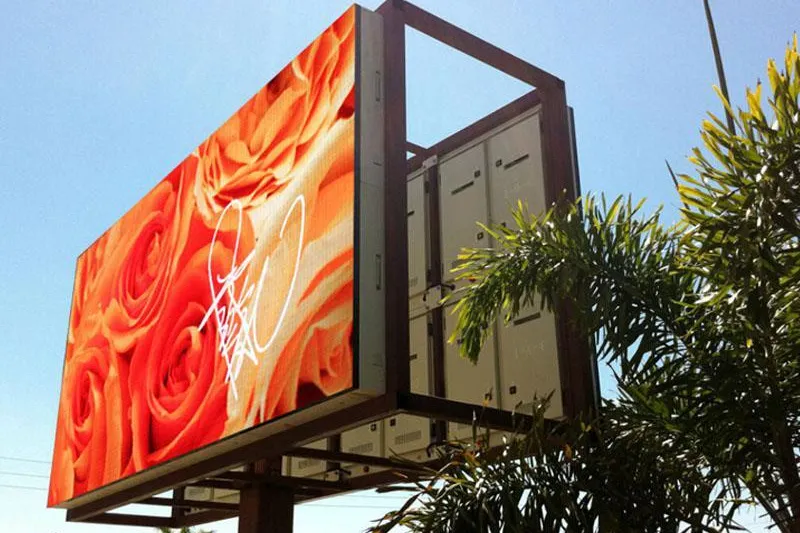
SMD screens are LED displays built from thousands of tiny surface-mounted LED packages. Each package holds a red, a green and a blue LED and acts as one pixel. Together they form a seamless, bright digital screen that can be built to almost any size.
If you are planning a screen for a shop, hall, office, campus or roadside location in Pakistan, this guide covers what you need to know before you ask for a quotation:
- what SMD screens are and how they work
- how SMD compares with DIP, COB and GOB displays
- the difference between indoor and outdoor screens
- the specifications that matter most
- what affects the price
- what to check in a supplier’s quote
If you already know the basics, you can compare options in Pixora’s range of LED displays.
What Are SMD Screens?
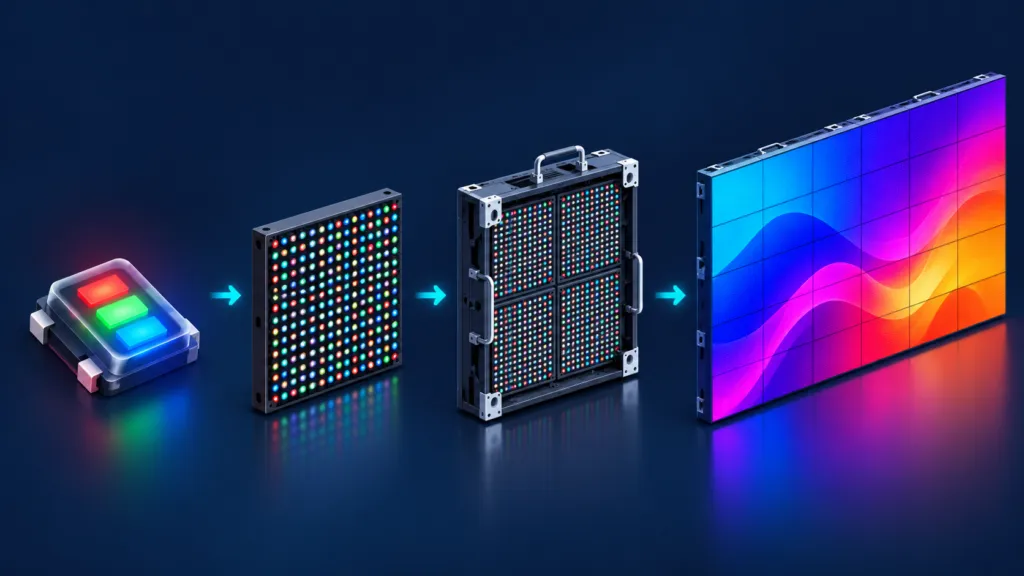
SMD stands for surface-mounted device. In an SMD screen, a red, a green and a blue LED chip are sealed together in one small package, often called a lamp bead. That package is soldered directly onto the surface of a circuit board.
Each lamp bead is one pixel. By changing the brightness of its three colours, every pixel can show almost any colour. Thousands of pixels together create text, images and video.
Is an SMD Screen the Same as an LED Screen?
Yes. “SMD” describes how the LEDs are packaged, not a different kind of light. Every SMD screen is an LED screen. DIP and COB are other ways of building an LED screen, compared below.
SMD screens are also different from “LED TVs” and most LCD video walls. Those are LCD panels lit from behind by LEDs. In an SMD screen, the LEDs themselves are the pixels you see.
How SMD Screens Work
An SMD screen is built in layers, a bit like tiles on a wall:
- LED packages are mounted on a circuit board to make an LED module, a small tile with a fixed number of pixels.
- Modules are fitted into a cabinet, a frame that also holds the power supplies and control electronics.
- Cabinets are joined together to form the complete screen.
Because the screen is made from modules and cabinets, its size grows in fixed steps. Your final screen may be slightly larger or smaller than the space you first measured. A good supplier will show you the nearest practical size.
A control system sends your content to the screen. There are two common ways to run it:
- Synchronous control mirrors a connected computer in real time. This suits presentations, live events and camera feeds.
- Asynchronous control stores content on a player and plays it on a schedule, with no computer connected. This suits advertising and signage.
Many systems support both. Decide early who will create and update the content, and how.
SMD vs DIP, COB and GOB
SMD, DIP and COB are three different ways of packaging LEDs. GOB is not a separate packaging type. It is a protective coating added to SMD modules.
| Type | How it is built | Best suited to | Main trade-off |
|---|---|---|---|
| DIP (through-hole) | Separate red, green and blue LEDs with leads that pass through the circuit board | Large-pitch outdoor screens viewed from far away | Low resolution; not suitable for close viewing |
| SMD | Red, green and blue chips in one package, mounted on the surface of the board | Most indoor and outdoor screens | LEDs on the surface can be damaged by knocks |
| COB (chip on board) | Bare LED chips mounted directly on the board and sealed under one protective layer | Very fine pitches and close viewing, such as boardrooms and control rooms | Higher cost at standard pitches; damage usually means replacing a module |
| GOB (glue on board) | An SMD module coated with clear protective resin | Screens in high-traffic areas that may be touched or bumped | Harder to repair, because the resin must be removed first |
Construction details based on the Daktronics LED Learning Center and other manufacturer documentation.
For most projects, SMD gives the best balance of cost, picture quality and serviceability. If people will regularly stand within a metre or two of the screen, it is worth comparing COB LED displays as well.
Indoor vs Outdoor SMD Screens
Indoor and outdoor SMD screens use the same basic technology, but they are built for very different conditions.
| Factor | Indoor SMD screens | Outdoor SMD screens |
|---|---|---|
| Environment | Controlled; competes with room and window light | Direct sun, rain, heat and dust |
| Typical brightness | Around 600–1,200 nits, adjustable | 5,000 nits or more, often with automatic dimming at night |
| Weather protection | Not needed for normal indoor use | Sealed modules and cabinets; IP65 is common on the front |
| Pixel pitch | Finer, for close viewing | Usually coarser, for viewing from a distance |
| Structure | Wall or frame mounting | A structure designed for the site, weight and wind |
| Common uses | Shops, showrooms, halls, lobbies, meeting rooms, auditoriums | Shopfronts, building façades, plazas, roadside advertising |
For product options and typical specifications, see Pixora’s pages on indoor SMD screens and outdoor SMD screens.
The Specifications That Matter
A specification sheet can list dozens of figures. For most buyers, these five matter most.
1. Pixel Pitch
Pixel pitch is the distance between the centres of two neighbouring pixels, in millimetres. P2.5 means 2.5 mm, and P4 means 4 mm. A smaller number means more pixels in the same area, which gives a sharper image up close. It also means a higher cost, because the screen needs more LEDs.
A screen’s resolution depends on its size and its pitch:
Pixels across = screen width (mm) ÷ pixel pitch (mm)
Here is an example using common 320 × 160 mm modules. A screen of 12 × 14 modules measures 3.84 m × 2.24 m:
- At P2.5, each module has 128 × 64 pixels, so the screen is 1,536 × 896 pixels.
- At P4, each module has 80 × 40 pixels, so the same screen is 960 × 560 pixels.
The P2.5 screen has about 2.5 times as many pixels in the same space. That is why it costs more and looks sharper from close range.
2. Viewing Distance
You will see different “viewing-distance rules” online. They do not contradict each other. They measure different things:
- Minimum acceptable viewing distance is how close people can stand before the image starts to look grainy. A common rule of thumb in the industry is about 1 metre for every millimetre of pitch, so roughly 3 m for a P3 screen.
- Visual acuity distance is how far away a person with normal (20/20) vision must stand before they can no longer see individual pixels at all. Planar calculates it as pixel pitch × 3,438, giving millimetres. That works out to about 10 m for a P3 screen.
Most viewers will be somewhere between these two distances, and the image will look good to them. In practice:
- Choose a pitch based on your closest regular viewer, not the furthest.
- Go finer if you will show small text or detailed data.
- Do not pay for a finer pitch than your space needs. If your nearest viewers are far away, they will not see the difference.
3. Brightness
Brightness is measured in nits. A screen needs to be bright enough for its surroundings, but not so bright that it causes glare.
Indoor screens typically run at around 600–1,200 nits and should be adjustable. Outdoor screens are typically 5,000 nits or more, so they stay readable in daylight. Ask whether the screen dims automatically at night. This improves viewer comfort and reduces power use.
4. Refresh Rate
Refresh rate, measured in hertz (Hz), is how many times per second the LEDs are refreshed. To the eye, most modern screens look steady. Cameras are different. They can pick up flicker or dark bands that people in the room do not notice, as display manufacturer Planar explains.
1,920 Hz is a common standard for screens that are only watched in person. If your screen will often be filmed, for example at weddings, conferences, stage events or in meeting rooms used for video calls, 3,840 Hz is commonly specified. Ask the supplier how the screen looks on camera, not just for the number.
5. IP Rating (Outdoor Screens)
IP ratings come from the international standard IEC 60529. The first digit covers dust and the second covers water. IP65 means the enclosure is dust-tight (6) and protected against water jets from any direction (5).
Outdoor cabinets are often rated IP65 on the front, while the rear rating depends on the design. If the back of the screen will face rain or dust, ask for both ratings. An IP rating does not cover heat, so ask separately about ventilation and operating temperature.
What Affects SMD Screen Prices in Pakistan
SMD screens are usually quoted per square foot or per square metre. The rate can vary a lot, because it depends on the specification and on what the quote includes. The main cost drivers are:
- Pixel pitch: finer pitches need more LEDs and electronics.
- Indoor or outdoor: outdoor screens need higher brightness, sealing and weatherproof cabinets.
- Screen size: more modules and cabinets.
- Component quality: the LEDs, driver chips and power supplies affect picture quality and reliability.
- Control system: a basic player costs less than a video processor with multiple inputs.
- Structure and installation: steel work, mounting height, site access, cabling and power arrangements.
- Exchange rate: many core components are imported, so prices can change over time.
This is why online “price per square foot” figures often do not match real quotations. Two quotes for “a P4 screen” can describe very different products and scopes of work. The only reliable way to compare is to ask every supplier to quote the same specification, in writing.
Buying Considerations: What to Check in a Quotation
Before you ask for quotes, note down a few basics:
- where the screen will go
- its approximate size
- how close your nearest viewers will be
- what content you will show
- whether the screen will be filmed
For outdoor screens, also consider sun direction, rain exposure, the structure and any permissions you need. Our outdoor LED screen checklist covers these in more detail.
Then use this checklist to compare quotations on equal terms:
| What to check | Why it matters |
|---|---|
| Pixel pitch, final size and resolution | Confirms you are comparing the same screen |
| Brightness and refresh rate | Ensures the screen suits your lighting and any camera use |
| LED and component brands | Affects colour quality, uniformity and reliability |
| IP rating, front and rear (outdoor) | Confirms protection against dust and rain |
| Control system and software | Determines how easily your team can update content |
| What installation includes | Structure, cabling, testing and training are often the biggest differences between quotes |
| Spare modules | Speeds up repairs and helps colours match after a replacement |
| Warranty and support terms, in writing | Clarifies what is covered, for how long and how quickly faults are fixed |
Also ask how the screen should be powered and protected, especially where power cuts or voltage fluctuations are common. It is much easier to plan this before installation than after.
Frequently Asked Questions
Should I choose an SMD screen or an LCD video wall?
An SMD screen is seamless, with no lines between panels. It can be built very large and very bright, including for outdoor use. An LCD video wall has thin lines between panels, but for small walls viewed up close it can give a sharper image at a lower cost. Large, bright or outdoor screens usually favour SMD. For small meeting-room walls, compare both.
What maintenance do SMD screens need?
Routine care is fairly simple:
- Keep the ventilation clear.
- Clean the screen only as the manufacturer recommends.
- Have the power and cabling checked from time to time.
If a module fails, it can usually be replaced without changing the whole screen. This is one reason spare modules are worth including in the quote.
Planning an SMD Screen?
The best recommendation starts with three facts: where the screen will go, its approximate size, and how close your nearest viewers will be. Share these details and request an itemised quote from Pixora. Then use the checklist above to compare every option on the same basis.